> ## Documentation Index
> Fetch the complete documentation index at: https://litprotocol-feature-jss-124-docs-update-docs-to-include-htt.mintlify.site/llms.txt
> Use this file to discover all available pages before exploring further.
# Payment Manager Setup
> Configure payment system for the Lit JS SDK
❗️ Currently free on the dev network, so no need to deposit funds. More
details coming soon for test and production networks.
💰 Need Test Tokens? Visit the [Chronicle Yellowstone
Faucet](https://chronicle-yellowstone-faucet.getlit.dev/) to get test tokens
for your EOA account.
See SDK Reference for more details on the Payment Manager. [Payment Manager
Reference](/sdk/sdk-reference/lit-client/functions/createLitClient#getpaymentmanager)
## Overview
The Payment Manager demonstrates Lit Protocol's payment system - a billing system for decentralised cryptographic services. Users pay for compute resources on the Lit network to access core services like:
* Encryption/Decryption - Secure data with programmable access control
* PKP Signing - Cryptographic keys that can sign transactions based on conditions
* Lit Actions - Serverless functions with cryptographic capabilities
Similar to how you pay AWS for cloud computing, this\system ensures the decentralised network can sustain itself and pay node operators. You can deposit funds, request withdrawals with security delays, and manage balances for yourself or other users (enabling applications to sponsor their users' costs for better UX).
```typescript theme={null}
import { createLitClient } from '@lit-protocol/lit-client';
import { nagaTest } from '@lit-protocol/networks';
// 1. Create lit client
const litClient = await createLitClient({ network: nagaTest });
// 2. Get PaymentManager instance (requires account for transactions)
const paymentManager = await litClient.getPaymentManager({
account: yourAccount // viem account instance
});
```
```typescript wagmi theme={null}
// 1. import the useWalletClient function from wagmi
import { useWalletClient } from 'wagmi';
// 2. Use your connected wallet as the account
const { data: myAccount } = useWalletClient();
```
```typescript viem/accounts theme={null}
// 1. import the privateKeyToAccount function from viem/accounts
import { privateKeyToAccount } from "viem/accounts";
// 2. Convert your private key to a viem account object that can be used for payment operations.
const myAccount = privateKeyToAccount(process.env.PRIVATE_KEY as `0x${string}`);
```
```typescript Deposit funds to your own account theme={null}
// 1. Deposit funds to your own account
const result = await paymentManager.deposit({
amountInEth: "0.1",
});
console.log(`Deposit successful: ${result.hash}`);
// Returns: { hash: string, receipt: object }
```
```typescript Deposit for another user theme={null}
// 1. Deposit funds for another user
const result = await paymentManager.depositForUser({
userAddress: "0x742d35Cc6638Cb49f4E7c9ce71E02ef18C53E1d5",
amountInEth: "0.05",
});
console.log(`Deposit successful: ${result.hash}`);
// Returns: { hash: string, receipt: object }
```
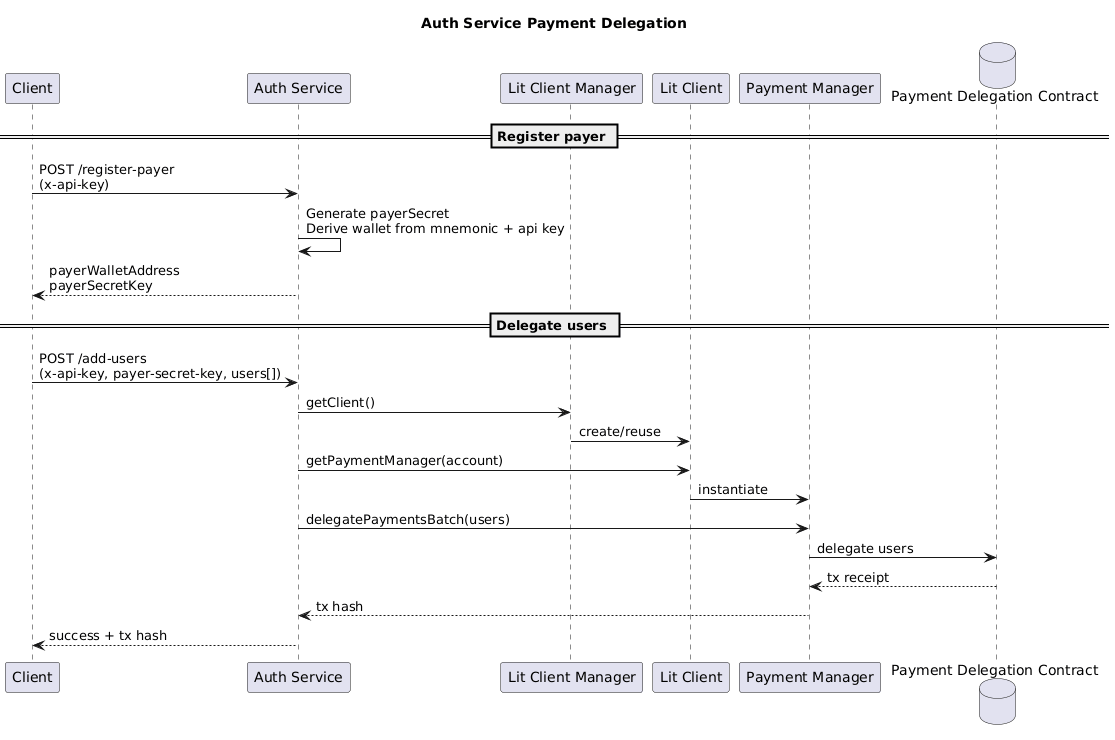
## Auth Service API Endpoints
Leverage the hosted Auth Service to manage delegation without exposing private keys in your application:
* `POST /register-payer` - Send your `x-api-key` header to receive a delegated payer address and `payerSecretKey`. Persist this secret securely; it is required for all future delegation calls.
* `POST /add-users` - Provide headers `x-api-key` and `payer-secret-key` plus a JSON body containing an array of user addresses. The Auth Service uses the Payment Manager internally to delegate payments to each address in a single transaction.
> The legacy capacity-credit minting flow has been removed. Payment delegation now interacts directly with the Payment Manager contracts.
```typescript theme={null}
import { createLitClient } from '@lit-protocol/lit-client';
import { nagaTest } from '@lit-protocol/networks';
// 1. Create the Lit client for the naga-test environment
const litClient = await createLitClient({ network: nagaTest });
const authServiceBaseUrl = 'https://naga-test-auth-service.example.com';
const apiKey = process.env.LIT_API_KEY!;
// 3. Register a payer wallet (store the secret securely server-side)
const registerResponse = await litClient.authService.registerPayer({
authServiceBaseUrl,
apiKey,
});
console.log('Payer wallet:', registerResponse.payerWalletAddress);
console.log('Payer secret (store securely!):', registerResponse.payerSecretKey);
// 4. Later on, delegate payments for multiple users using the saved secret
const delegateResponse = await litClient.authService.delegateUsers({
authServiceBaseUrl,
apiKey,
payerSecretKey: registerResponse.payerSecretKey,
userAddresses: [
'0x1234...abcd',
'0xabcd...1234',
],
});
console.log('Delegation submitted with tx hash:', delegateResponse.txHash);
// 5. Continue to use the same payer secret for future delegation calls
```
### How the Auth Service derives payer wallets
* The service holds a single root mnemonic (`LIT_DELEGATION_ROOT_MNEMONIC`).
* `/register-payer` combines the `x-api-key` header with a freshly generated `payerSecretKey`. That pair is hashed into a deterministic derivation index, which is then used with the root mnemonic to derive a unique child wallet.
* The response includes the derived wallet address and the random `payerSecretKey`. The server does not store this secret; you must persist it securely on the client side.
* Later, `/add-users` expects both headers (`x-api-key` and `payer-secret-key`). The service recomputes the same derivation index and wallet on the fly, so the same header pair always maps to the same child wallet.
* Calling `/register-payer` again with the same API key issues a new random `payerSecretKey`, which leads to a different child wallet. Choose whether to rotate secrets or keep the original one depending on your application needs.